
Transform Your Email
Experience
Smart Mind AI brings intelligent email management to your fingertips. Streamline communication, boost productivity, and never miss what matters.
Mind Mail V1.0.1
Works with: 


How You Can Use It
Unlock smarter email management in just a few clicks
Generate Insights
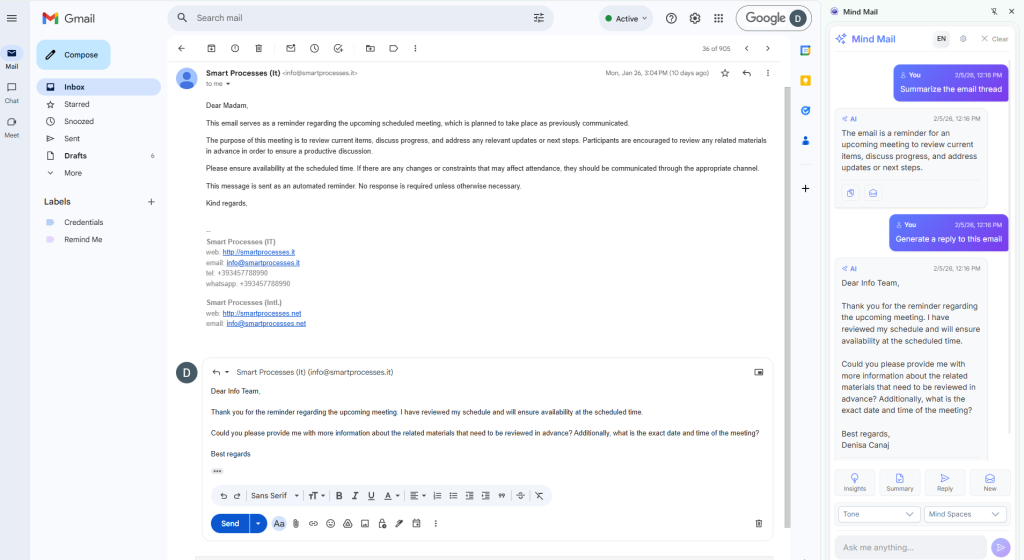
Mind Mail helps you instantly identify the topic, urgency, tone, and key points of any email, so you can prioritize your responses and make smarter decisions faster.
Summarize Conversations
Stop scrolling through endless email threads. Mind Mail provides clear, AI-powered summaries of conversations, letting you understand the context and key points in seconds.
Draft Replies
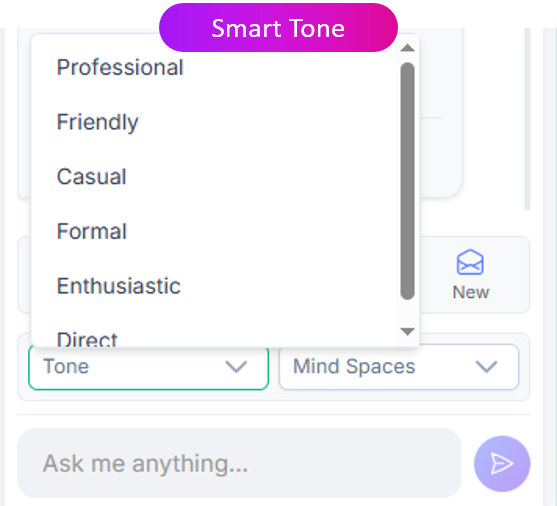
Save time with AI-generated draft responses tailored to each email. Mind Mail suggests replies based on context, so you can respond quickly while keeping your messages accurate and professional.
One-Click to Composer
Send insights, summaries, or draft replies directly to your email composer with a single click. Mind Mail makes it effortless to act on suggestions without interrupting your workflow.
Multi-Language Support
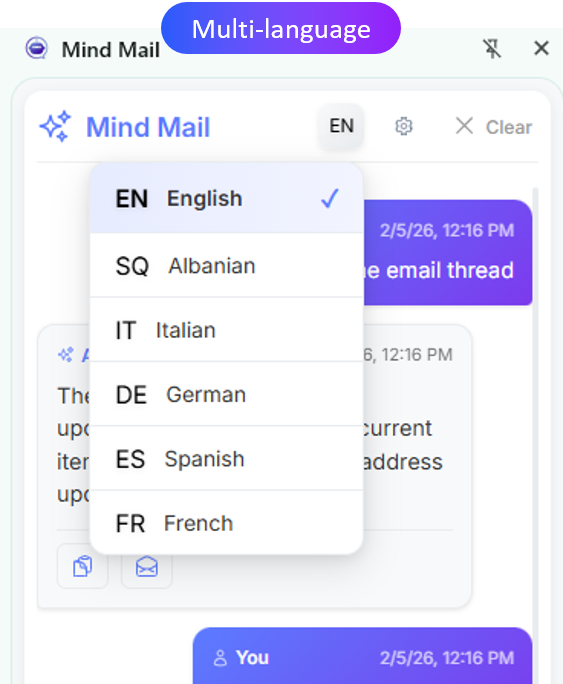
Compose, translate, or reply in multiple languages directly within your inbox. Mind Mail makes communication easier, faster, and accessible across teams, clients, or global contacts.
Mind Spaces Integration
Seamlessly connect with your Mind Spaces documents. Request, access, or attach files directly from your inbox without switching apps, keeping your workflow smooth and organized.
Install SmartMind Mail Extension
Available for Chrome, Edge, and Outlook. Choose your platform below to get started.
Install on Chrome
Quick and easy installation directly from the Chrome Web Store
Click the button below to install SmartMind Mail directly to your Chrome browser. The extension will be added automatically and ready to use.
Installation Steps:
- Click the “Install for Chrome” button
- You’ll be redirected to the Chrome Web Store
- Click “Add to Chrome”
- Confirm the installation
- Start using SmartMind Mail!
Install on Edge
Install SmartMind Mail on Microsoft Edge using the official add-ons page.
Video Installation Guide
Watch our step-by-step video tutorial
What you’ll learn:
How to install the SmartMind Mail extension from Edge Add-ons
How to enable and manage extension permissions
How to access the extension from your browser toolbar
How to start using the main features
Install on Outlook
Enterprise installation - Contact us for assistance
Installing SmartMind Mail for Outlook requires enterprise setup and configuration. Our team will guide you through the process and ensure everything works perfectly.
Why contact us?
- Outlook add-ins require administrator privileges
- We’ll help with your organization’s specific setup
- Get personalized support and training
- Ensure compliance with your IT policies
Having Trouble Installing the Product?
Don’t worry — we’re here to help. Whether you need guidance with installation, configuration, or first-time setup, our support team is ready to assist you.
Please note: if you prefer our team to handle the installation on your behalf, an additional service fee may apply.
Why Choose Mind Mail
Designed to make your inbox faster, smarter, and stress-free
- Breeze through your inbox and focus on what really matters.
- Let AI whip up smart replies in no time.
- Spot the key points and tone without endless scrolling.
- Work seamlessly across Gmail, Outlook, and web email.
- Keep your conversations tidy, clear, and easy to follow.
- Say goodbye to repetitive tasks and get more done every day.
Choose Your Deployment
All products available in cloud or on your infrastructure
Cloud Solution
Intelligent Knowledge. Instantly Available.
Unlock the full power of Smart Mind AI in a secure, fully managed cloud environment. Make smarter decisions, automate workflows, and empower your team.
Access from anywhere, on any device
No infrastructure hassle or maintenance
Easy integration with existing tools
Flexible AI use cases across products
Private Deployment
Enterprise-Grade. On Your Terms.
Deploy Smart Mind AI on your own infrastructure with complete control, maximum security, and full customization. Perfect for strict compliance requirements.
Complete control over data and infrastructure
Air-gapped deployment with military-grade security
Dedicated hardware for optimal performance
Full customization to match your requirements
Quick Setup
Install Mind Web Concierge in Under 3 Minutes
Get your intelligent assistant up and running with our simple 3-step process
1. Find Mind Mail
Open Google Workspace Marketplace (for Gmail)
or Microsoft AppSource (for Outlook)Search for Mind Mail – Smart AI Email Assistant
Open the app listing
2. Install & Connect
Click Install / Get It Now
Sign in with your Google or Microsoft account
Grant secure access permissions
3. Launch in Your Inbox
Open Gmail or Outlook
Click the Mind Mail icon inside your email panel
Start generating insights, summaries, and smart replies instantly
Automatic Setup Complete
Everything you need is configured automatically:
Secure account connected
Your inbox is safely linked
7-day free trial started
No credit card required
AI engine activated
Ready to analyze and assist
Works inside your email
No switching apps needed
Cloud Pricing
Flexible Plans, Clear Value
Pick the plan that works for your team and workflow.
Perfect for testing the platform
- AI-powered email summaries for selected threads
- Smart one-click reply suggestions
- Basic inbox clarity & organization tools
- Works inside Gmail & Outlook
- No credit card required
Best for power users and growing professionals.
- Reduce email time by up to 50%
- Generate context-aware AI replies instantly
- Turn long threads into clear executive summaries
- Up to 1M Input + 0.25M Output AI tokens/month
- Advanced tone control & smart inbox prioritization
Save with annual billing
- Full Professional capabilities — without restrictions
- Unlimited AI summaries & response generation
- Designed for sustained high-volume email workflows
- Annual savings with one month free
- Priority AI queue & executive-level support
Free Trial
0€
Perfect for testing the platform
Auto-Activated on Install
- AI-powered email summaries for selected threads
- Smart one-click reply suggestions
- Basic inbox clarity & organization tools
- Works inside Gmail & Outlook
- No credit card required
Most Popular
Monthly
40€/month
Best for power users and growing professionals.
Install from Chrome Web Store
- Reduce email time by up to 50%
- Generate context-aware AI replies instantly
- Turn long threads into clear executive summaries
- Up to 5M Input + 2M Output AI tokens/month
- Advanced tone control & smart inbox prioritization
Yearly
440€/year
Save with annual billing
Get 12 Months. Pay for 11.
- Full Professional capabilities — without restrictions
- Unlimited AI summaries & response generation
- Designed for sustained high-volume email workflows
- Annual savings with one month free
- Priority AI queue & executive-level support
Ready to get started?
Mind Mail is an AI-powered email assistant that simplifies your inbox, delivering smart summaries, instant replies, and context-aware insights across Outlook, Gmail, and the web.
Install on Chrome
Quick and easy installation directly from the Chrome Web Store
Click the button below to install SmartMind Mail directly to your Chrome browser. The extension will be added automatically and ready to use.
Installation Steps:
- Click the “Install for Chrome” button
- You’ll be redirected to the Chrome Web Store
- Click “Add to Chrome”
- Confirm the installation
- Start using SmartMind Mail!
Install on Edge
Follow our step-by-step video guide for Edge installation
Installing SmartMind Mail on Microsoft Edge requires a few manual steps. Watch our detailed video tutorial below for complete instructions.
Video Installation Guide
Watch our step-by-step video tutorial
Installation Steps:
- Click the “Install for Chrome” button
- You’ll be redirected to the Chrome Web Store
- Click “Add to Chrome”
- Confirm the installation
- Start using SmartMind Mail!
Install on Outlook
Enterprise installation - Contact us for assistance
Installing SmartMind Mail for Outlook requires enterprise setup and configuration. Our team will guide you through the process and ensure everything works perfectly.
Why contact us?
- Outlook add-ins require administrator privileges
- We’ll help with your organization’s specific setup
- Get personalized support and training
- Ensure compliance with your IT policies